
OS Manager
Accelerate Firmware & OS Upgrades Across Your Entire Network
Why OS Manager?
Reduce Risk & Downtime
Minimize human error and avoid manual missteps with a fully automated, policy-driven upgrade process.
Accelerate Update Cycles
Shrink network-wide OS upgrade timelines from months to days with intelligent orchestration across all device types.
Respond Faster to Security Threats
Quickly patch vulnerabilities identified by vendors before they become business risks—protecting against financial, operational, and reputational damage.
Enable New Capabilities
Roll out firmware versions that unlock critical features without the fear of disrupting services.
Stay Compliant & Supported
Ensure devices stay within warranty and avoid lapses in support due to outdated OS versions.

Jason Clark, Senior Director of Infrastructure Core Services at First Citizens Bank, reveals essential strategies for using network automation to power ongoing IT and business innovation.
Take Control of Upgrades and Patching
Orchestrate Multi-Vendor OS Changes
Upgrading firmware and operating systems across network infrastructure has long been a painful, high-risk task for IT teams – often delayed due to complexity, downtime risk, and resource demands. But in today’s security-first environment, delaying critical updates can leave your organization exposed.
Key Capabilities
- Automated, Network-Wide OS Upgrades — Streamline firmware and OS updates across multi-vendor, multi-platform networks—no manual scripting required.
- Security-Driven Update Intelligence — Identify and prioritize critical OS upgrades using integrated vendor vulnerability data, SmartNet advisories, and lifecycle status.
- Policy-Based Version Control & Compliance — Define approved OS versions, enforce consistency, and ensure compliance across all network devices.
- Safe, Scheduled Rollouts with Rollback Protection — Use scheduling tools for phased deployment and rely on built-in backup and rollback to minimize risk during upgrades.
Feature Highlights
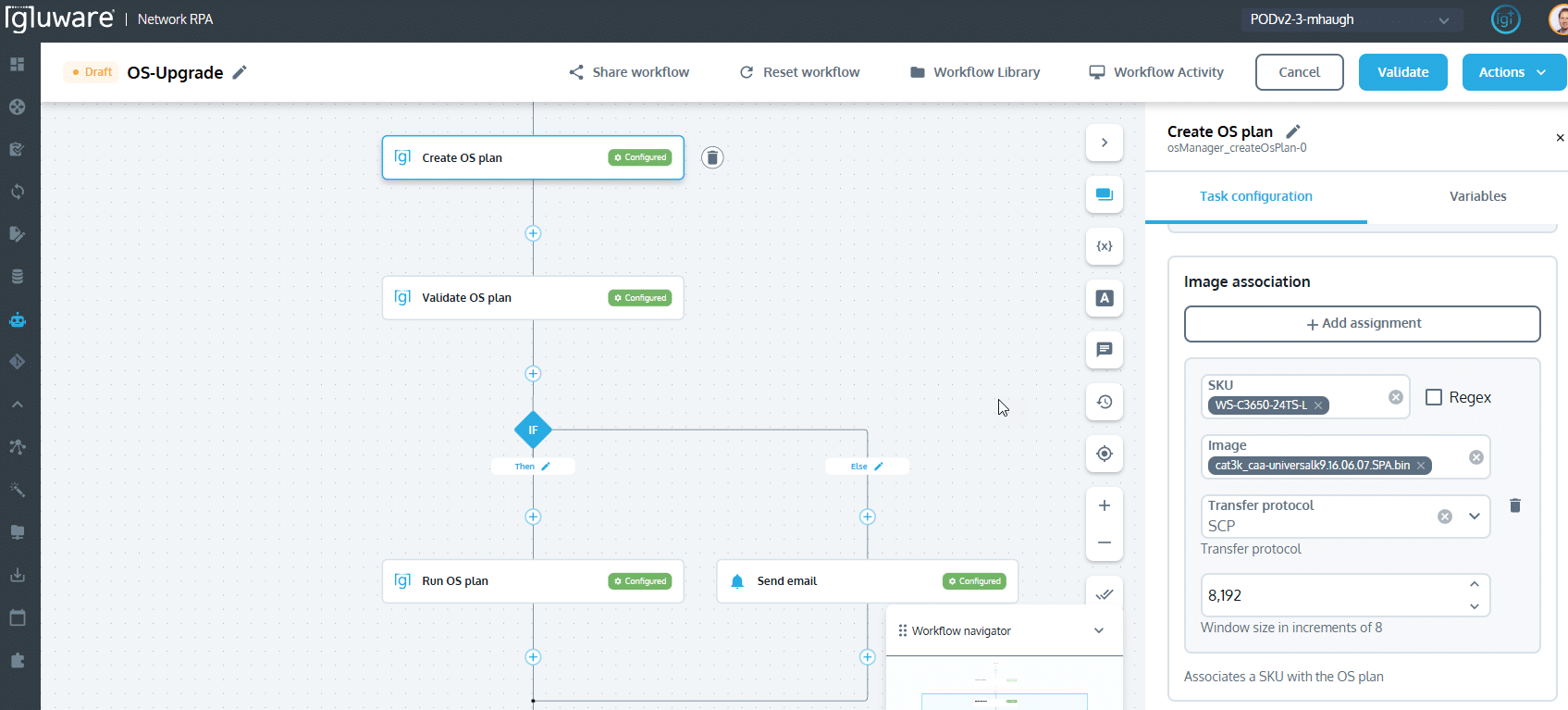
Use Network RPA to Create OS Plans, Validate and Run OS Plans
Automated Firmware & OS Upgrades
- Orchestrate OS upgrades across multi-vendor, multi-platform environments with no manual scripting required
- Automate the entire upgrade workflow—from image verification to deployment and post-upgrade validation
Security-Driven Upgrade Planning
- Identify and act on vendor-disclosed vulnerabilities that require OS updates
- Prioritize upgrades using integrated security advisories, EoL/EoS data, and SmartNet contract details
Policy-Based Version Control
- Define and enforce approved firmware/OS versions across the network
- Ensure consistency and compliance with enterprise standards
Software Package Management
- Centralized management of firmware and OS images in a built-in software repository
- Verify image integrity and match device compatibility before deployment
Scheduled and Phased Rollouts
- Use the built-in scheduler to plan updates during approved maintenance windows
- Support staged rollouts for controlled testing and rollback if needed
Rollback & Recovery
- Automatically back up configurations pre-upgrade
- Execute one-click rollback in case of failure or policy violation
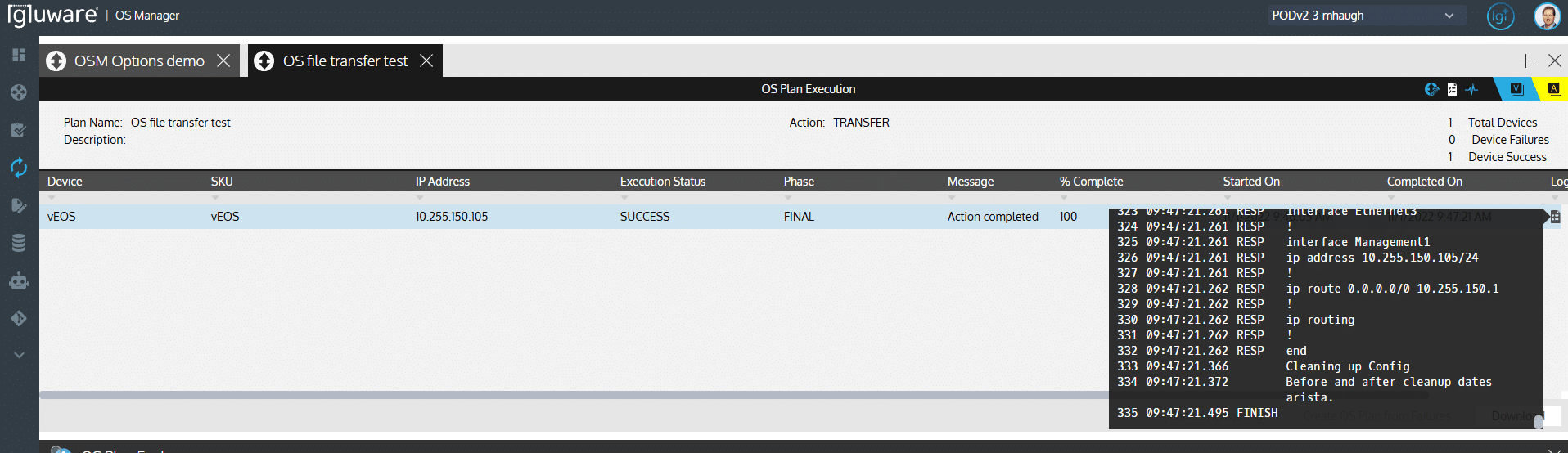
Summary Level Results and Detailed Logs Capturing Device Interaction
Comprehensive Reporting & Audit Trails
- Track upgrade status across all devices with real-time dashboards
- Maintain detailed logs and audit trails for governance and compliance
Integrated with Gluware Intelligent Network Automation
- Seamlessly operate alongside other Gluware applications like Device Manager, Audit, and Inventory
- Use with Network RPA workflows for end-to-end upgrade automation